Overview
Twin4Water is a production digital twin for water distribution networks. Built for HKUST’s Innovation and Technology Fund water infrastructure programme, it brings hydraulic network modelling, live sensor telemetry, physics-based simulation, and diagnostic workflows into a single web product — so researchers and operators work from one source of truth instead of disconnected tools.
About the client
The Hong Kong University of Science and Technology (HKUST) runs an ITF water infrastructure programme that needs research-grade tooling for network modelling, sensor monitoring, and advanced diagnostics — without forcing operators into specialist desktop software for every task.
The twin had to feel like an operations product: map-first editing, authenticated multi-user access, facility and project management, and simulation jobs that can run for minutes without blocking the UI.
Their challenges
Water digital twins usually fracture across GIS editors, SCADA viewers, offline simulation scripts, and ad-hoc notebooks. HKUST needed those capabilities composed — editable networks, live loggers, and physics runs in one authenticated workspace.
- 01
Fragmented tooling
Network geometry, sensor streams, and hydraulic simulation lived in separate environments — making it hard to keep a campus network model consistent and actionable.
- 02
Research-grade physics at product speed
Method of Characteristics (MOC) simulation, calibration, and leak localization are compute-heavy. They needed to run as managed jobs with progress, artefacts, and recoverable failures — not laptop scripts.
- 03
Sensor truth vs model truth
Passive testing against HWM DataGate loggers had to sit beside the digital network so pressure and flow channels could inform diagnostics instead of living in another silo.
- 04
Operator UX for complex objects
Pipes, nodes, tanks, valves, pumps, hydrants, consumers, and sensors needed map editing, property panels, layer controls, and import/export — without burying users in raw INP files.
Our solutions
We shipped Twin4Water as a three-service system: a React map client, a NestJS API for projects and network data, and a FastAPI simulation sidecar wrapping the MOC pipeline — so UI, data, and physics stay loosely coupled but tightly composed.
Mapbox network editor
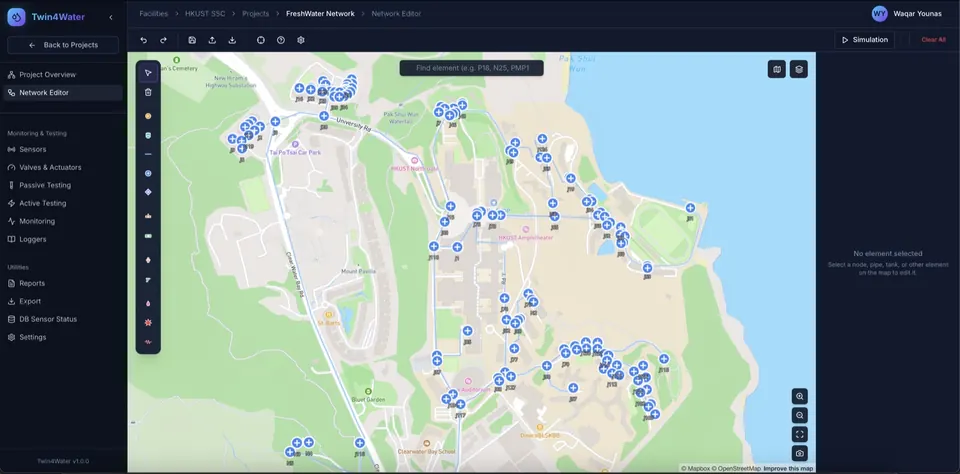
Interactive campus GIS editing for pipes, nodes, tanks, valves, pumps, and sensors — with tool palettes, properties panels, layer visibility, style switching, alignment tools, and onboarding hints for first-time editors.
HWM DataGate monitoring
Live passive testing and monitoring against HWM DataGate loggers with pressure and flow channels, so field telemetry sits next to the twin instead of in a separate portal.
MOC simulation sidecar
A FastAPI service runs the Method of Characteristics pipeline as managed jobs — queue, progress streaming, summary parsing, CSV/JSON artefacts, and ZIP downloads — called by the NestJS API over HTTP.
Calibration & leak localization
Dedicated panels and backend modules for calibration runs and Time Reversal leak localization, with websocket progress so long jobs stay visible and recoverable in the operator UI.
Projects, facilities & auth
JWT authentication, role-based access, facility/project management, sharing, snapshot export/import, and unit controls — a full multi-user research and operations shell around the twin.
Technology stack
The technology we used
- React + TypeScript
- Map-first operator client with Vite, TanStack Query, and Zustand.
- Mapbox GL / Leaflet
- Campus GIS canvas for network geometry and spatial workflows.
- NestJS API
- Auth, projects, facilities, network CRUD, HWM sync, calibration and leak jobs.
- FastAPI + MOC pipeline
- Simulation sidecar wrapping Method of Characteristics physics runs.
- HWM DataGate
- Sensor logger integration for passive testing and live channels.
- ECharts
- Pipe results, convergence, transient signals, and boundary charts.
Key features built
What we delivered
| Capability | What we built |
|---|---|
| Hydraulic network editor | Create and edit pipes, nodes, tanks, valves, pumps, hydrants, consumers, and sensors over campus GIS — including INP import paths for industry-standard model exchange. |
| Passive testing workspace | Monitor HWM DataGate loggers with pressure/flow channels and session history views tied to the network model. |
| Simulation & analytics | Queue MOC runs, track progress, inspect pipe pressure/flow tables, convergence plots, transient signals, and download artefacts. |
| Diagnostics toolkit | Calibration and Time Reversal leak localization panels with live job progress for research and field programmes. |
| Sensor placement optimization | Optimizer settings and selection workflows to plan logger placement against network topology. |
| Secure multi-user shell | Login, protected routes, roles, project sharing, and snapshot export/import for reproducible twin states. |
Conclusion
Twin4Water gives HKUST a single digital twin workspace where the network model, sensor truth, and physics jobs stay connected — from first pipe drawn on the map to leak localization artefacts ready for review.
That same pattern — map twin + live sensors + managed simulation — is what utilities and research operators need when spreadsheets and offline solvers stop scaling.